 by
by Today we will be reviewing Mr.Natural’s malicious activity which is also a little quiz. This will just be a simple pcap review but within the pcap you can extract the malware to analyze statically or launch it and see what it does dynamically.
- LAN Segment – 10.12.1.0/24
- DC – MrNatural-DC
- Gateway – 10.12.1.1
First thing I look for is http get/response requests

I want to see if I can find any kind of suspicious requests that interacted with our host so far t497sword.com sticks out like a sore thumb and the target was host DESKTOP-NATURAL. so we will want to keep that noted. But we want to see what is possibly happening between these two and one way to start is a TCP Stream.

As you can see in the beginning of the request and we can see the entire GET request of the malicious url link. Also knowing this is one of the lower numbers of the packet count this is possibly where the malware begins.
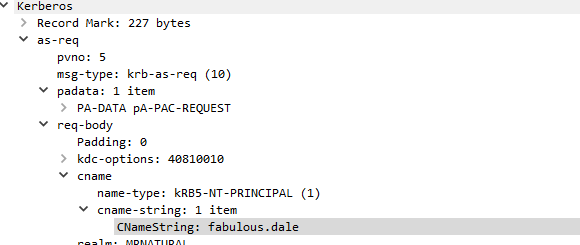
I decided I wanted to get a brief look at our host as that is important on who to talk too after the analysis. The Computer name is DESKTOP-NATURAL and it Looks like our victim is wonderful “fabulous.dale”, now don’t always assume our host downloaded the malware himself he could’ve been compromised and logged in to a different location on our network to exploit us BUT based off of other packets in our pcap this is most definitely the users fault.
Now lets investigate more into our host and see what kind of conversations have been unfolding. Now I usually analyze conversation from most to least packets exchanged.

Our hosts best friend is 206.189.56.140 and we want to see what kind of conversations have been exchanged between them.
Already I can see another malicious domain. You also have the option to resolve IP to Domain names in the conversations window.

and I start to analyze the TCP stream, from their I notice another domain and it looks like all of this is referring to a Internet Widget pty Ltd. So what sometimes happens is malware reaches out to multiple C2 Servers and unfortunately I don’t have the live alerts of this malware but they tend to “Beacon” saying “Hey I am here! Can you hear me out there!” or they will actively connect to malicious domains to download different kinds of malware. Follow the TCP STREAM!!!!!!!!!

After that I wanted to investigate more into “Internet Widget pty ltd” and thankfully this pcap isn’t flooded with thousands of domains. I did discover woodenbruus which also showed “Internet Widgets pty LTD” again you follow the TCP stream. They tend to uncover a lot of information on what is happening besides all the “gibberish” characters.

after I investigate majority if not all of the malicious domains I now look into objects. BE VERY CAREFUL as this can download live malware and last thing you want to do is extract malware and end up being like our wonderful friend dale. This is how you can extract the hash for the malware and compare it to virustotal and you can analyze the malware with appropriate tools. Sadly that won’t be apart of this but I will be extracting malware and providing insight on what is the malware doing and what is happening in future posts.

Also if you happen to analyze the CnC Alerts you’ll see its a IcedID also know as a BokBot which is a banking trojan. This malware acts as a dropper for other malware that’s why our good friend t497 was reaching out to various domains to download more malware to abuse the system. Fabulous dale was probably working in a financial institute and BokBot decided it was time to extract some info. Here is some Virus total information

Overall this was a fun analysis and sadly I couldn’t do a full report such as extracting malware and dissecting it but I will try my best for future posts to put full reports. If you have any questions please reach out to me via Social Media or Email.
Malware Source – https://www.malware-traffic-analysis.net/2020/12/03/index.html
IcedID information – https://www.cisecurity.org/white-papers/security-primer-icedid/
 CyberSecurity Blog